 DOCS/VIEWALYZER/TRACE TUNE
VIEWALYZER · GPUI EDITION
DOCS/VIEWALYZER/TRACE TUNE
VIEWALYZER · GPUI EDITION
Trace Tune
A node graph that derives new traces from existing ones: wire a trace into a formula, look at the result, and push it back into the Trace panel as a channel of its own, once or continuously while recording.
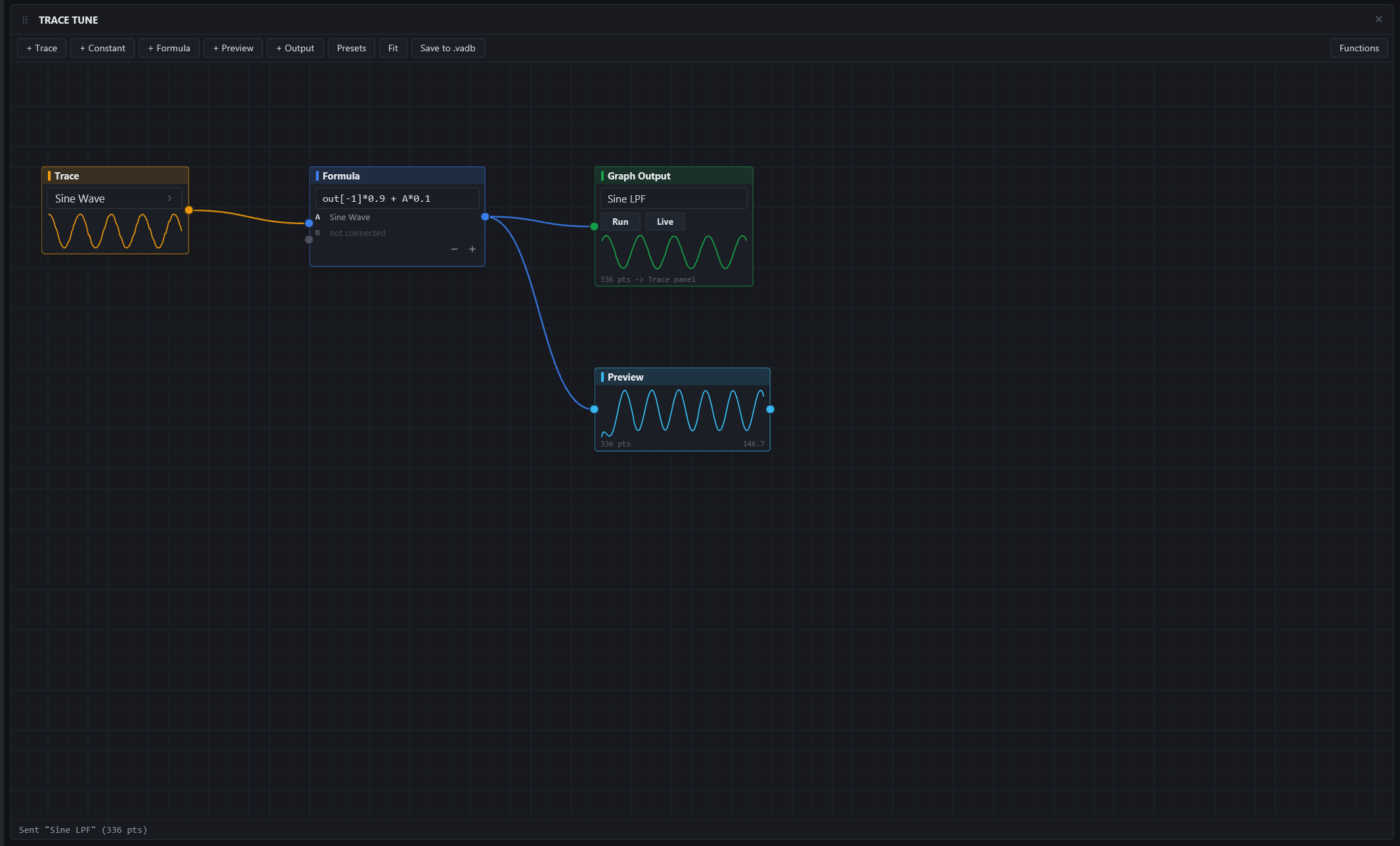
Needs: a recording with traces, or a live capture. Works with polled symbols and domain channels too.
The canvas
Nodes on a pannable, zoomable canvas. Add them from the toolbar:
| NODE | ROLE |
|---|---|
| Trace | An input: pick any channel of the recording. Bound by name, so the graph rebinds to the same trace in the next capture |
| Constant | A number |
| Formula | An expression over its inputs, with t (time) and dt (time since the previous sample) available, so derivatives and integrals are ordinary formulas |
| Preview | A small chart of whatever is wired into it |
| Output | A derived trace: name it, and Run evaluates it over the recording, Live keeps it evaluating while recording |
Drag from a node's output port to another node's input to wire them; drag a node by its title to move it; the mouse wheel zooms, dragging empty canvas pans, Fit frames the graph.
Multi-rate inputs are aligned in time (the primary input's timeline, with the others sample-held), and filter state carries across live updates, so a low-pass in Live mode is the same filter it would be offline.
Formulas
Arithmetic and comparisons over the node's inputs (A, B, ...), history offsets (A[-1] is the previous sample of A), the node's own previous output (out[-1], which is how a one-line IIR filter is written), and a function set: ABS ACOS ASIN ATAN ATAN2 CEIL CLAMP COS DB DBV DEADBAND EXP FLOOR HYPOT HZ2PERIOD IF LERP LOG LOG10 MAP MAX MIN MOD PERCENT PERIOD2HZ POW ROUND SIGN SIN SQRT TAN TANH WRAP. The reference button on the toolbar lists each one with its signature and a one-line description.
Presets insert ready-made subgraphs: Low-pass filter, Derivative, Integrator, Rescale (MAP), RMS envelope, and a pre-wired PID loop with its gains as constants.
Saving
- The graph itself persists between runs.
- Save to .vadb writes the derived traces into the open recording as regular channels, replacing an earlier trace of the same name, so a colleague opening the file sees them without Trace Tune.
- Save Config in the sidebar stores the tune setup inside the
.vacfconnection config. Loading such a config never applies it silently: the toolbar offers Load setup from config, and a trace bound in the stored setup is only reconnected while a trace of that name exists.
Tips
- Overlay an output on its input in the Trace panel (drag one chart's grip onto the other's centre) to judge a filter by eye.
- A derivative of a polled tick counter is a live event-rate meter that needed no firmware change at all.